You land at Incheon, connect to wifi, type your hotel into Google Maps — and it says “Can’t find a way there.” Welcome to the one thing nobody warns you about: in one of the most wired countries on earth, the world’s default map app basically doesn’t navigate. It happens to almost every first-time visitor, and the fix takes about five minutes.
Here’s exactly why Google Maps fails in Korea, and how to set up the two apps locals actually use — Naver Map and KakaoMap — in English before you even leave the airport.
Short answer: Google Maps shows the map but can’t give walking or driving directions in Korea, because of national-security limits on exporting map data. Download Naver Map (best all-round, best English) and KakaoMap (best for transit and taxis), switch both to English, and you’ll never get lost.
Prefer to watch? Here’s the 30-second version:
Why Google Maps doesn’t work in Korea
It’s not your phone, and it’s not a bug you can fix. Korean law restricts exporting high-precision map data out of the country, originally for security reasons. Google stores its map data on overseas servers, so it can’t offer full navigation here.
What that means on the ground:
- Walking and driving directions: mostly unavailable or wrong. This is the big one.
- Bus routes: incomplete and often out of date.
- Subway: actually passable in Seoul, but still weaker than the local apps.
- Business listings: opening hours and closures are frequently wrong.
Google Maps is still fine for planning from home — browsing neighborhoods, dropping a pin, looking at satellite view. Just don’t rely on it to get you anywhere once you land.
The two apps locals actually use
Koreans don’t use Google Maps. They use two free apps, and the smartest move is to install both.
Naver Map is the one to start with. Naver is basically the Google of Korea, and its map app has the best English interface, the most complete business listings, and reliable walking and transit directions. It’s also where you’ll find real reviews, photos, and accurate opening hours for restaurants and cafes. For most travelers, this is your primary app.
KakaoMap is the perfect complement, and it’s stronger for public transit. It shows real-time bus and subway arrivals — down to the second — and it will even tell you which subway car to board so you exit closest to your transfer or destination. It also links to Kakao T, the app Koreans use to hail taxis.
Use Naver Map to find places and routes; lean on KakaoMap when you’re deep in the subway system.
How to set Naver Map to English
By default the app may open in Korean. Switching is quick:
- Open Naver Map and tap the menu icon.
- Go to Settings (the gear icon).
- Tap Language, then choose English.
- The app restarts in English. Menus and buttons are now English; place names and reviews stay in Korean — which is exactly how locals see them.
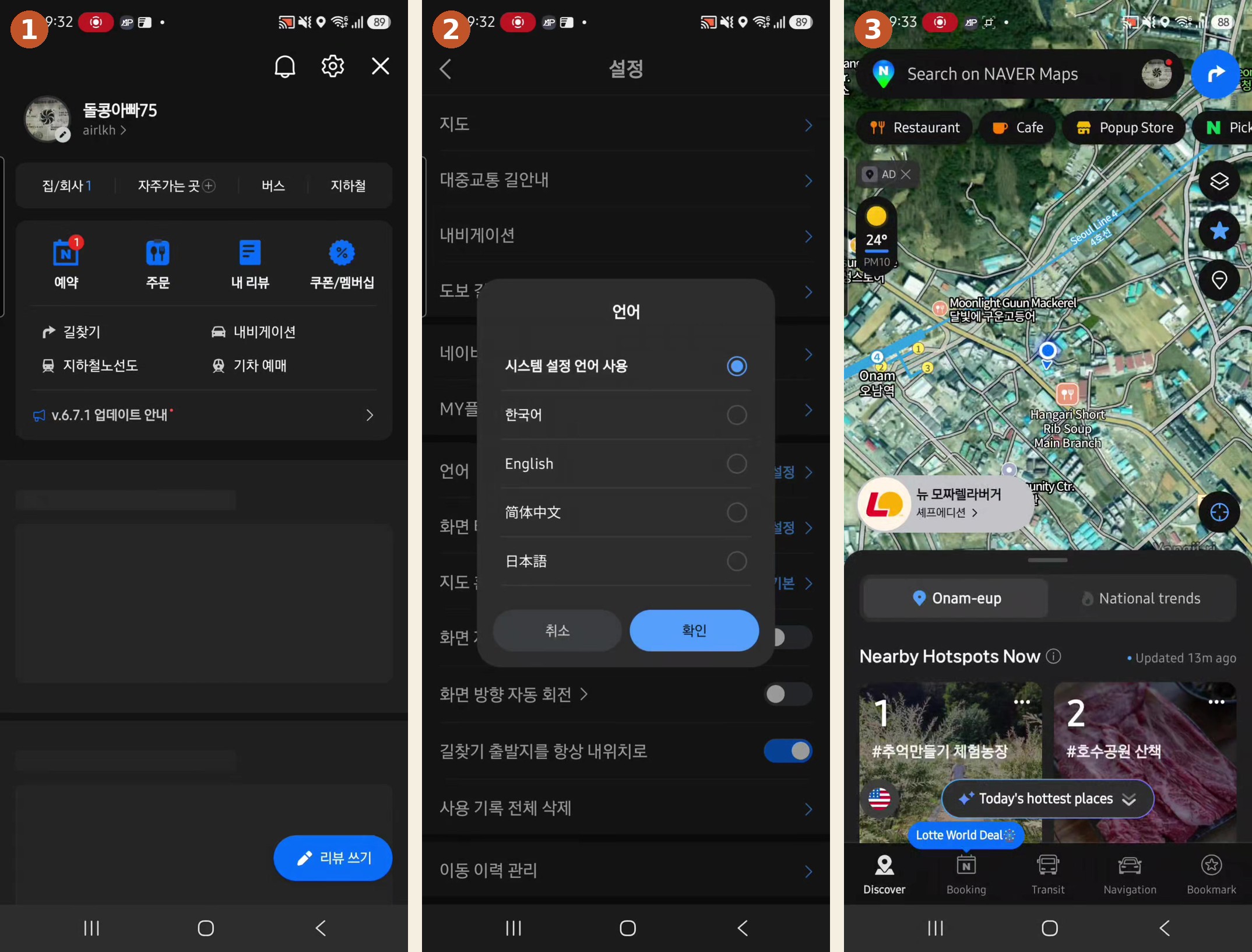
You don’t need a Korean phone number or an account to search and navigate. An account only adds bookmarks and reviews.
How to set KakaoMap to English
Same idea, just as fast:
- Open KakaoMap and go to Settings.
- Find the Language option and select English.
- The interface switches over. As with Naver, shop names stay in Korean.
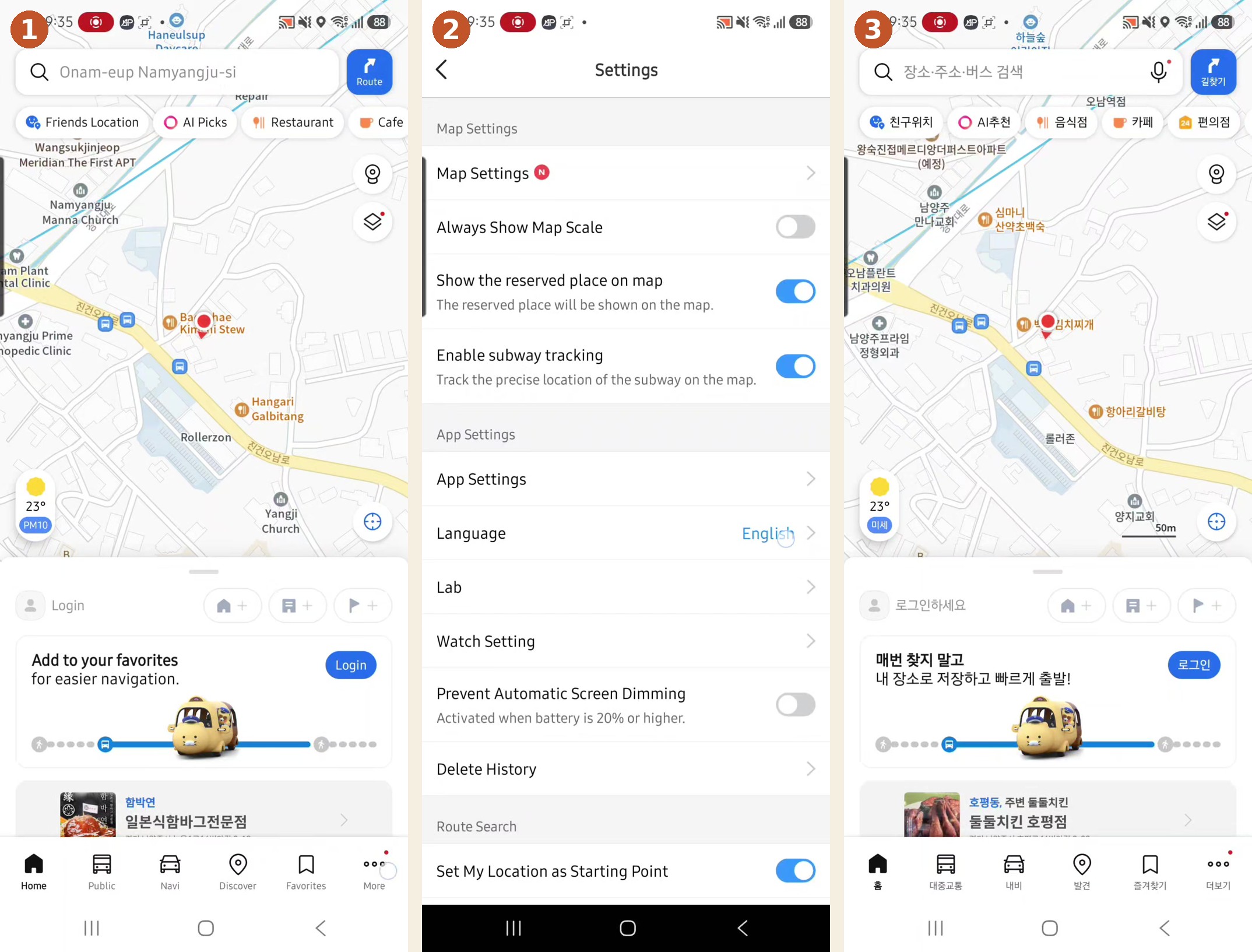
Using them like a local
A few things that save you once you’re moving:
- Follow the exit number. Korean subway stations are huge — the right exit (e.g., “Exit 5”) can be the difference between arriving across the street or a ten-minute walk away. Both apps tell you which one to take.
- Screenshot your route before going underground. Signal can drop between stations, and neither app has full offline maps.
- Search in English for big stuff — landmarks, stations, hotels all work. For a small local spot, copy and paste the Korean name for an exact match.
- Let KakaoMap pick your subway car to line up with your exit or transfer. It’s a small thing that makes you feel like you’ve lived here for years.
Do this before you land
Set everything up on home or hotel wifi so you’re not fumbling on arrival:
- Download Naver Map and KakaoMap before your flight.
- Switch both to English.
- Save your accommodation and the airport as bookmarks.
- Pair them with a Korea eSIM or SIM so you have data the moment you land — these apps need internet to work.
For getting from the airport into the city once you’re set up, see how to get from Incheon Airport to Seoul.
FAQ
Does Google Maps work in Korea at all? Partly. You can view the map and search for places, but walking and driving navigation don’t work. Use Naver Map or KakaoMap for actual directions.
Naver Map or KakaoMap — which is better? Naver Map is the better all-rounder and has the best English support, so start there. KakaoMap is better for real-time public transit. Install both.
Do I need a Korean phone number or account? No. You can search and navigate without an account or a Korean number.
Can I use these apps offline? Not reliably — they need an internet connection, so get a SIM or eSIM. Screenshot important routes as a backup.
Does Apple Maps work in Korea? It works better than Google Maps, but it still has less detail than the Korean apps, especially for buses and local businesses.
More honest Korea
Getting around is step one. For the rest of your trip, here’s how to get from Incheon Airport to Seoul, and once you’re hungry, how Koreans actually eat Korean BBQ.
The screenshots here are from my own phone, set up the same way I tell visitors to do it — not stock images.