If your card was declined on the Korail app with no explanation, nothing is wrong with your card. Use the Korail global website in a desktop browser instead — it’s the English-language booking site built for foreign users, it accepts a passport number instead of a Korean ID, and it processes Visa and Mastercard.
That fixes it for most people. The rest of this explains why it breaks, what to do when it still doesn’t work, and the small detail that causes most of the failures nobody can diagnose.
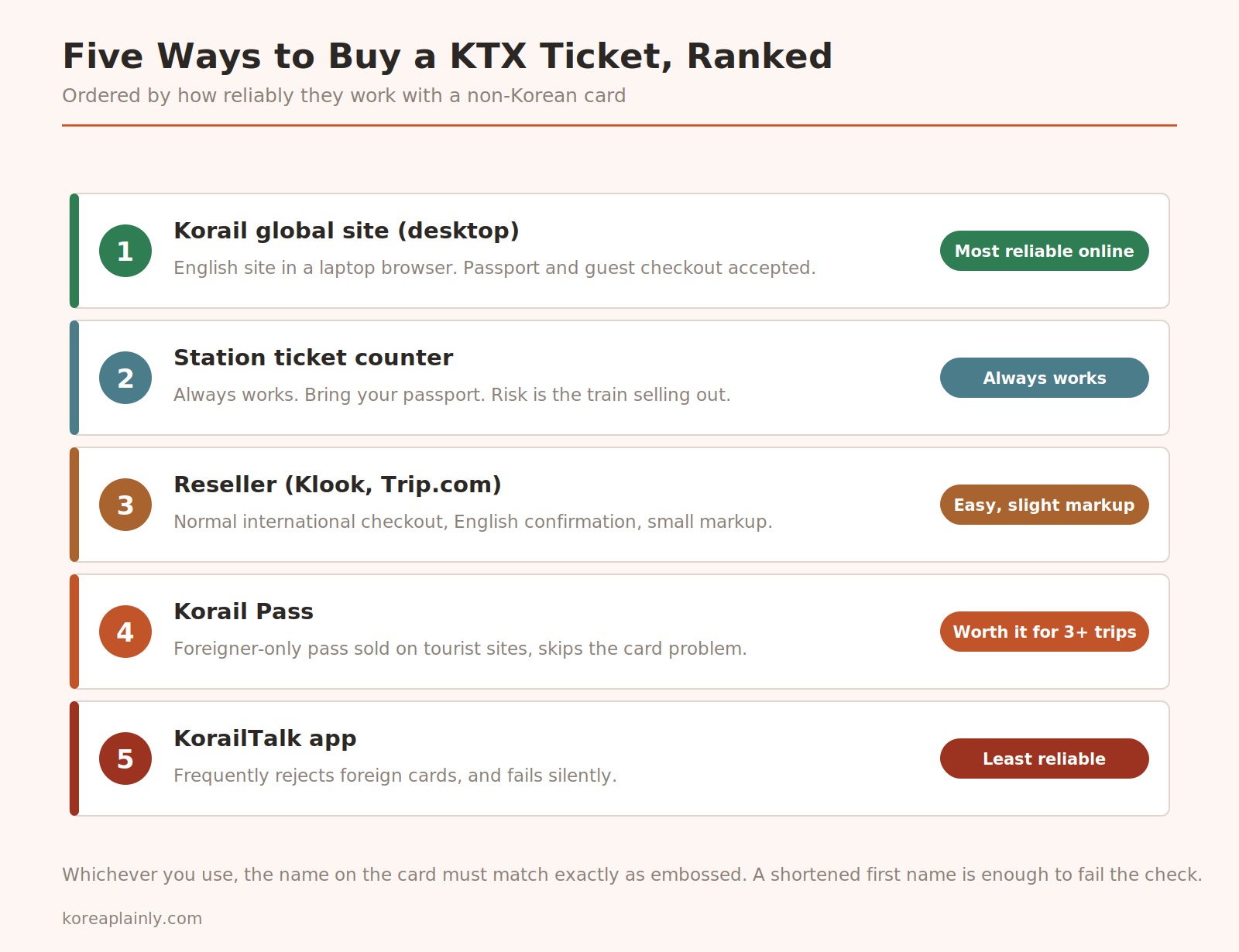
Why the app rejects you
Korean online payment grew up around domestic bank cards. Checkout flows assume a Korean card, usually a Korean phone number for SMS verification, and a name that matches a Korean-format record exactly.
When an international card enters that flow, it gets routed through an extra verification layer — 3D Secure, identity confirmation, sometimes a Korean phone number. Any of those steps can fail. And the app frequently doesn’t tell you which one did. You get a generic failure, no charge, no ticket, and no path forward.
This is why the problem feels unfixable. It isn’t a bug you can work around by trying again; it’s a different checkout path that either exists for you or doesn’t.
The five methods, in order
1. Korail global site on a laptop — best online option
Open the English Korail site in Chrome on a desktop or laptop. Not the app. Mobile browsers work but the desktop flow is more reliable.
- Guest checkout is available — you don’t need an account
- Select “Foreigner” as ID type and enter your passport number exactly as printed
- Visa and Mastercard both process
One quirk that stops people cold: you can’t type station names freely. Click the search icon and pick the station from the list that pops up. Typing “Busan” into the field and moving on will leave it empty.
2. Station ticket counter — always works
Walk up, show your passport, pay. Staff at major stations handle this in English routinely, and foreign cards work at the counter even when they failed online.
The only downside is availability. If you turn up on a Friday afternoon wanting the 18:00, it may be gone. Use this as a fallback, or when you’re already at the station and travelling the same day.
Ticket machines also exist, but only the ones labelled for foreign cards will take yours.
3. Resellers — easy, small markup
Klook and Trip.com sell KTX tickets through a normal international checkout. You pay a few thousand won extra and get an English confirmation email.
Worth it if you want the booking settled before you fly, or if the official site has already defeated you once. The markup is small enough that arguing about it costs more than paying it.
4. Korail Pass — for multiple long trips
A foreigner-only unlimited rail pass, sold on tourist-facing sites, which means it sidesteps the card problem completely.
Do the arithmetic before buying. A Seoul–Busan round trip alone is roughly ₩120,000, so a pass covering two or more days of travel can pay for itself quickly — but only if you’re actually taking several long journeys. For one round trip, buy tickets.
5. KorailTalk app — least reliable
The official app, and the thing most people try first because it’s the obvious choice. It’s the method most likely to fail on a foreign card, and it fails without telling you why. Use it only if you have a Korean card or a resident registration number.
The detail that breaks most bookings
The name on the card must match exactly as embossed.
Not “close enough.” If your card reads JOHN A SMITH and you enter John Smith, the 3D Secure check can reject it — and the rejection surfaces as a generic payment failure, so you’ll assume the card is the problem rather than the spelling.
Copy it character for character from the card itself. This one thing accounts for a large share of the failures people can’t explain.
Two smaller ones:
- Use mobile data rather than hotel Wi-Fi if the payment step hangs. Some hotel networks interfere with the verification redirect.
- Make sure it’s the real app. There are lookalikes.
When to book
Reservations open one month before departure. Resellers that advertise booking a year ahead are holding your request, not your seat.
For ordinary weekday travel, a few days ahead is fine and you’ll have your pick of times. Book at the one-month mark if you’re travelling on:
- Chuseok or Seollal — the two biggest holidays, when effectively the whole country is on the move
- Any summer weekend, especially toward Busan
- Friday evening or Sunday evening, in either direction
Once you have the ticket
Your reservation is a QR code or a printed ticket, and Korean trains don’t have ticket gates — you walk straight to the platform. Staff check tickets on board occasionally rather than always. This is not a licence to skip buying one; sitting in someone’s reserved seat is the more common tourist error, and the person holding the reservation will appear.
Seats are assigned. Window seats are A and D. If you want a quieter carriage, the end cars tend to fill last.
For which service to take in the first place — KTX, SRT, bus, or flight — see Seoul to Busan compared. For getting around once you’re off the train, how to pay for transit in Korea covers transport cards.
Frequently asked questions
Why did my foreign card fail on the Korail app? The app routes international cards through an extra verification layer that often breaks, and it usually doesn’t report which step failed. Use the Korail global website on a desktop instead.
Can I book KTX tickets before arriving in Korea? Yes, through the Korail global site or a reseller, once the one-month booking window has opened for your date.
How far in advance do reservations open? One month before departure.
Do I need a Korean phone number? Not on the global site or through resellers. Some discounted fares on the domestic system do require one.
Can I just buy at the station? Yes, and it always works. The risk is your train being sold out.
Is the Korail Pass worth it? Only for three or more long journeys. For a single round trip, individual tickets are cheaper.